
- curl --location 'https://api.deltapayofficial.com/api/hosted/payment/initiate' \
- --header 'ApiKey: YOUR_API_KEY' \
- --header 'SecretKey: YOUR_SECRET_KEY' \
- --form 'amount="1"' \
- --form 'ipn_url="https://api.merchantportal24.com/api/test/ipn/data"' \
- --form 'order_id="45454545444433"' \
- --form 'channel_id="1"' \
- --form 'msisdn="03096698418"' \
- --form 'customer_name="John Doe"' \
- --form 'email="example@gmail.com"' \
- --form 'description="Test payment"'
DEVELOPER DOCUMENTATION
Build faster with Delta Pay APIs
Collection, QR and disbursement integration references in one place.
API Documentation: Payment Integration Guide
Getting Started
Welcome to DeltaPay's Collection API, a powerful tool designed to streamline your payment collection processes. Our API allows businesses to seamlessly integrate with various payment channels, enabling efficient and secure collection of funds from customers. Whether you're handling recurring billing, online sales, or any other type of payment collection, our Collection API ensures smooth and reliable transactions. With DeltaPay's Collection API, you can enhance your payment infrastructure , improve cash flow management, and provide a seamless payment experience for your customers.
To start integration, follow these steps:
Sign Up for DELTA PAY
To get started with DELTA PAY, visit our sign-up page. Enter your username or email and password to create an account. Make sure to agree to our cookie policy for the best user experience. Once registered, you'll have access to DELTA PAY's Sandbox services. For any issues with login or password retrieval.
first
Access Your API Key on DELTA PAY
Access Your API Key on DELTA PAY After registering on the DELTA PAY portal, log in to your account to access the API key. Navigate to the API section in your account settings to find your unique API key. This key is essential for integrating DELTA PAY services with your applications, enabling secure and efficient transactions. Ensure to keep your API key confidential to protect your account. For more details, visit the DELTA PAY portal.
Business Api's Key
Ensure these keys are securely stored to maintain the integrity and security of your application. For more details, visit the DELTA PAY portal.
Base URL
https://api.deltapayofficial.com/api
Hosted Method
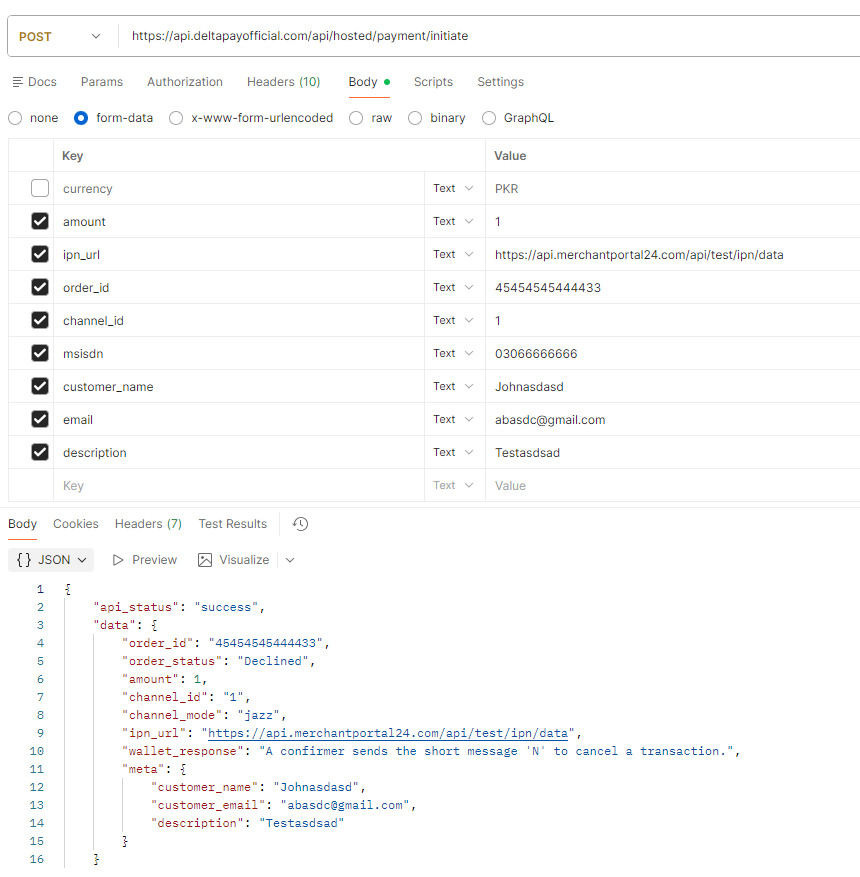
Use this API to initiate a hosted payment. When this API is called, a payment request is sent to the user's mobile device for OTP confirmation. After the user confirms the payment, you will receive a callback on your provided IPN_URL. The API also returns a JSON response.
Endpoint
https://api.deltapayofficial.com/api/hosted/payment/initiate
Required Headers
- ApiKey: Your API key for authentication.
- SecretKey: Your secret key for authentication.
Body Parameters
- amount (int32, required): The amount you want to transact.
- Example: 1
- ipn_url (url, required): Instant Payment Notification URL.
- Example: https://api.merchantportal24.com/api/test/ipn/data
- order_id (string, required): A unique ID generated for the transaction.
- Example: 45454545444433
- channel_id (int32, required): Payment channel selection.
- Channel 1: JazzCash
- Channel 2: EasyPaisa
- msisdn (string, required): Customer mobile number.
- Example: 03096698418
- customer_name (string, optional): Customer name.
- Example: John Doe
- email (string, optional): Customer email address.
- Example: example@gmail.com
- description (string, optional): Payment description.
- Example: Test payment
Redirection Method
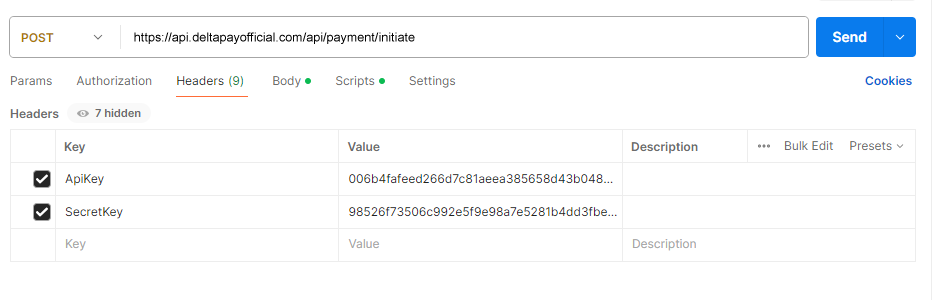
Required Headers
- ApiKey: Your API key for authentication.
- Example: 006b4fafeed266d7c81aeaa385658d43b048...
- SecretKey: Your secret key for authentication.
- Example: 985267f3506c992e5f9e98a7e5281b4dd3fbe...
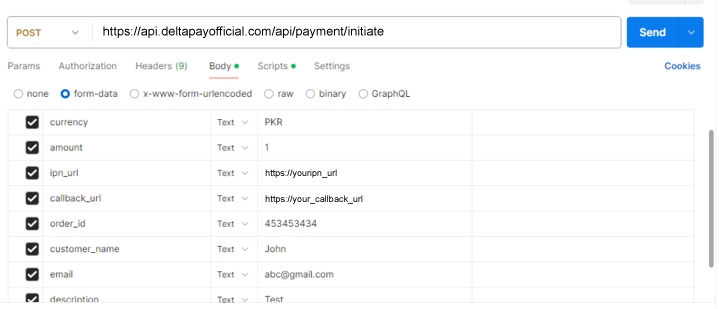
Body Parameters
- currency (string, required): Currency code, must be in uppercase.
- Example: PKR, USD
- amount (int32, required): The amount you want to transact.
- Example: 1
- ipn_url (url, required): Instant Payment Notification URL.
- Example: https://royaliemporium.pk
- callback_url (url, required): The URL to redirect to after a successful payment.
- Example: https://royaliemporium.pk
- order_id (string, required): A unique ID generated for the transaction. Length should be between 5 to 50 characters.
- Example: "order_id": "A1B2C3D4E5"
-
6. customer_name
- The person name who make want to transaction. Name should no be greater than 20 characters
- The person email who make want to transaction.
- Details of your payment or transaction. Details should no be greater than 500 characters
.png)
Error (400 Bad Request)
An error response indicating that something went wrong with the request parameters.
QR Code Payment API Documentation
DeltaPay - AikPay QR Payment Integration Guide
1. Overview
This API is used to create a QR payment order. After a successful request, the system returns a
qr_url and qr_text. Merchants can use either the ready-made redirection
flow or build their own hosted QR payment page.
| Flow | How it works |
|---|---|
| Redirection Flow | Open the returned qr_url. The customer will see the QR code page, scan it, and the page will automatically update after payment confirmation. |
| Hosted / Custom QR Flow | Use the returned qr_text to generate and display the QR code on your own website or mobile app. Payment confirmation will still be sent to your IPN URL. |
2. Create QR Payment
Endpoint
https://api.deltapayofficial.com/api/qr/code/payment/initiate
Headers
- ApiKey: YOUR_PUBLIC_API_KEY
- SecretKey: YOUR_SECRET_KEY
Request Parameters
| Parameter | Required | Type | Description |
|---|---|---|---|
| amount | Yes | Numeric | Payment amount. |
| ipn_url | Yes | URL | Merchant IPN/webhook URL where payment status will be sent. |
| callback_url | Yes | URL | Merchant callback URL. |
| order_id | Yes | String | Unique merchant order ID. |
| channel_id | Yes | Number | Use 4 for QR payment. |
| meta.customer_name | No | String | Customer name. |
| meta.customer_email | No | Customer email. | |
| meta.description | No | String | Payment description. |
Example cURL
curl --location 'https://api.deltapayofficial.com/api/qr/code/payment/initiate' \
--header 'ApiKey: YOUR_PUBLIC_API_KEY' \
--header 'SecretKey: YOUR_SECRET_KEY' \
--form 'amount="1"' \
--form 'ipn_url="https://your-domain.com/payment/ipn"' \
--form 'callback_url="https://your-domain.com/payment/callback"' \
--form 'order_id="1122332211122"' \
--form 'channel_id="4"' \
--form 'meta[customer_name]="John Doe"' \
--form 'meta[customer_email]="john@example.com"' \
--form 'meta[description]="Test Payment"'
Note: For meta fields, send data as meta[customer_name],
meta[customer_email], and meta[description]. If
customer_name or email are sent directly, they may not appear inside the meta response.
Success Response
{
  "status": "success",
  "message": "QR generated successfully",
  "data": {
    "id": "3be1ac08-6af8-485e-9ffd-1e9721218d4e",
    "amount": 1,
    "order_id": "1122332211122232",
    "wallet_order_id": "AIK645sd288066",
    "ipn_url": "https://your-domain.com/payment/ipn",
    "callback_url": "https://your-domain.com/payment/callback",
    "meta": {
      "customer_name": "John Doe",
      "customer_email": "john@example.com",
      "description": "Test Payment"
    },
    "qr_url": "https://api.deltapayofficial.com/qr/code/payment/3be1ac08-6af8-485e-9ffd-1e9721218d4e",
    "qr_text": "00020101021228760032808238..."
  }
}
3. Payment Flows
A. Redirection Flow
Use this flow if you want to redirect the customer to the ready-made QR payment page.
After creating the payment, open the returned qr_url in the browser.
Example qr_url
https://api.deltapayofficial.com/qr/code/payment/3be1ac08-6af8-485e-9ffd-1e9721218d4e
The customer can scan the QR code using Easypaisa, JazzCash, or any supported banking app. When payment is completed, the page will automatically update and show success or failed status.
B. Hosted / Custom QR Flow
Use this flow if you want to show the QR code on your own website or mobile app.
Use the qr_text value from the API response and generate a QR code on your own side.
Example qr_text
00020101021228760032808238...
You can generate a QR image using any QR library or QR image API. Example:
https://api.qrserver.com/v1/create-qr-code/?size=300x300&data=YOUR_QR_TEXT
Replace YOUR_QR_TEXT with the qr_text returned by the API.
4. Payment Status IPN
After the customer pays, the system will send payment status to the
ipn_url provided in the create payment request.
IPN Payload
{
  "status": "Paid",
  "orderId": "1122332211122232",
  "amount": 1,
  "number": null,
  "transactionId": "9828814872096754"
}
Status Meaning
| Status | Meaning |
|---|---|
| Pending | Payment is still pending. |
| Paid | Payment completed successfully. |
| Declined | Payment failed or declined. |
5. Error Response Example
{
  "status": "error",
  "error": [
    "The order id has already been taken."
  ]
}
6. Important Notes
order_idmust be unique for every payment request.channel_idmust be4for QR code payment.- For redirection flow, use
qr_url. - For custom hosted flow, use
qr_text. - Payment confirmation will be sent automatically to your
ipn_url. - Keep your
ApiKeyandSecretKeyprivate. Do not expose them in frontend JavaScript or mobile apps.
Verify Payment (APIs)
To ensure the payment is completed, your application must verify the payment state. You will need to make a request with the following endpoint.
Endpoint
https://api.deltapayofficial.com/api/payment/verify
.png)
.png)
Body Parameters
- order_id (string, required): The unique ID you received in the response.
- Example:
453453434
- Example:
Required Headers
- ApiKey: Your API key for authentication.
- Example: 006b4fafeed266d7c81aeaa385658d43b048...
- SecretKey: Your secret key for authentication.
- Example: 985267f3506c992e5f9e98a7e5281b4dd3fbe...
Payment Statuses
- Pending
- Paid
- Declined
- Failed
.png)
Integration Guide
Curl Integration Guide
- curl --location --request POST 'https ://api.deltapayofficial./com/api'\
- --header 'ApiKey: 9a5cd8e5beb32c70400bfdcf5f576562bd09202d' \
- --header 'SecretKey:
- --form 'currency=PKR' \
- --form 'amount=100' \
- --form 'ipn_url=https://deltapayofficial.com/' \
- --form 'callback_url=https://deltapayofficial.com/' \
- --form 'order_id=256985412569' \
- --form 'customer_name=John Doe' \
- --form 'email=example@gmail.com' \
- --form 'description=""'
PHP Integration Guide
                                     $curl= curl_init();
                                    curl_setopt_array($curl, array(
                                        CURLOPT_URL => 'https://api.deltapayofficial./com/api/payment/init',
                                        CURLOPT_RETURNTRANSFER => true,
                                        CURLOPT_ENCODING => '',
                                        CURLOPT_MAXREDIRS => 10,
                                        CURLOPT_TIMEOUT => 0,
                                        CURLOPT_FOLLOWLOCATION => true,
                                        CURLOPT_HTTP_VERSION => CURL_HTTP_VERSION_1_1,
                                        CURLOPT_CUSTOMREQUEST => 'POST',
                                        CURLOPT_POSTFIELDS => array('currency' => 'PKR','amount' => '100'),
                                        CURLOPT_HTTPHEADER => array(
                                            'ApiKey: 9a5cd8e5beb32c70400bfdfc5f575652bd09202d',
                                            'SecretKey: f2cc7f986a81b14525807a37a6a89ec99b8a82b6'
                                        ),
                                    );

                                    $response = curl_exec($curl);

                                    curl_close($curl);

                                   echo $response;
RUBY Integration Guide
-
                                                require "uri"
                                                require "net/http"
                                                url = URI("https://api.deltapayofficial./com/api/payment/initiate"
                                                http = Net::HTTP(url.host, url.port)
                                                request = Net::HTTP::post.new(url)
                                                request["ApiKey"] = "9a5cd8e5beb32c70400bfdcf5f576562bd09202d"
                                                request["SecretKey"] = "f2cc7f986a81b14525807a37a6a89ec99b8a82b6"
                                                form_data = {
                                                'currency' => 'PKR',
                                                'amount' => '100',
                                                'ipn_url' => 'https://deltapayofficial.com/',
                                                'callback_url' => 'https://deltapayofficial.com/',
                                                'order_id' => '256985412569',
                                                'customer_name' => 'John Doe',
                                                'email' => 'example@gmail.com',
                                                'description' => ''
                                                }

                                                request.set_form form_data, 'multipart/form-data'

                                                response = http request(request)
                                                puts response.read_body
Nods Js Integration Guide
                                      var request = require('request');
                                      var options = {
                                        'method':'POST',
                                    'url' 'https://api.deltapayofficial./com/payment/initiate',
                                     'headers': {
                                          'ApiKey': '9a5cd8e5beb32c70400bfdcf5f576562bd09202d',
                                         'SecretKey': 'f2cc7f986a81b14525807a37a6a89ec99b8a82b6'
                                        },
                                        formData: {
                                            'currency':'PKR',
                                            'amount':'100',
                                            'ipn_url':'https://deltapayofficial.com/',
                                            'callback_url':'https://deltapayofficial.com/',
                                            'order_id':'256985412569',
                                            'customer_name':'John Doe',
                                            'email':'example@gmail.com',
                                            'description':''
                                        }
                                      };

                                     request (options, function (error, response) {
                                        if (error) throw newError (error);
                                     console.log(response.body);
                                      });
Python Integration Guide
                                        import requests

                                        url = "https://api.deltapayofficial./com/payment/initiate"
                                        payload={'currency': 'PKR',
                                    'amount' '100',
                                       'ipn_url':   'https://deltapayofficial.com/',
                                    'callback_url':   'https://deltapayofficial.com/',
                                       'order_id':  '256985412569',
                                      'customer_name':   'John Doe',
                                      'email':  'example@gmail.com',
                                      'description'  : ''
                                        files=[

                                        ]
                                        headers = {
                                             'ApiKey': '9a5cd8e5beb32c70400bfdcf5f576562bd09202d',
                                                'SecretKey': 'f2cc7f986a81b14525807a37a6a89ec99b8a82b6'
                                        response = requests.request(  "POST", url, headers=headers, data=payload, files=files)
                                        print (response.text)
Delta Pay Disbursement Api's
Introduction
Welcome to DeltaPay Disbursement Api's, your premier solution for seamless payment disbursement through mobile wallets and IBFT (Interbank Fund Transfer). Designed with efficiency and security in mind, DeltaPay simplifies the complex process of distributing funds across multiple recipients. Whether you need to handle payroll, vendor payments, or any other form of financial disbursement, our software provides a robust, user-friendly platform to ensure transactions are executed quickly and accurately. With DeltaPay, managing payments through mobile wallets and IBFT has never been easier, empowering your business to operate smoothly and focus on what truly matters.has never been easier, empowering your business to operate smoothly and focus on what truly matters.
Disburse Funds to Registered Mobile Wallet & IBFT
API consumers will pass API body as encrypted and will also expect response in encrypted form. Encryption algorithm along with keys to be shared while integration onboarding.
AES -128 -CBC with HEX (BASE16) notation applied for encryption/decryption.. API keys to be shared separately.
https://www.devglan.com/online-tools/aes-encryption-decryption // You can use this reference for encryption and decryption.
Api Details
Below is the API signature.
Url
https://api.deltapayofficial.com/api/third-party-integration/disburse/payment/initiate
API Header
Following is the sample header APIs.
- PublicKey : ae32030e4f15d2a2d4a425e3a8fc69af6285ec
- SecretKey : 67c184cd2f9094ed4f84125b9d9a41941db74
- AesKey : I7kEZ8gCFPHA7V
- AesIv : AVXd9CylwhDhbh
API Request Body Specification
The unencrypted Body mobile wallet disbursement API is as below
                                    import requests
                                    {
                                    "order_id":"533421343",     //Unique
                                    "name":"john",
                                    "account_number":"0309*********",   // Mobile Wallet Number
                                    "amount":"1000",
                                    “ipn_url”:”https://abc.com/ipn/data”  // where user get callback response in payload
                                    "type":"jazzcash"    //type will be easypaisa, jazzcash, bank
                                    “bank_code”:”12421”  //only mandatory when type is bank. Bank codes are given in last of Documentation.
                                    }
Below is the sample expected Form body for disbursement API which needs to be passed
The unencrypted Body mobile wallet disbursement API is as below
                    {
                        "data": "547F21830BA5B6DF781A90C963471C5D6822875488C8BBEBA5D912EE6EAD82D232CC7BAD84429E8E388ECA6456
                        29D3173B530B04602C2B00B79197BFBEBA9B0D1EBB387AAD8F95BDBFAE40E2C8E960EAA1F6248041154329CAD3A53B120DA
                        F4A607ABD659019DCC707836F32C841D0C2D70E58B34D094CA923C84BF9E6BC45F4"
                    }
API Response
Below is the sample unencrypted response for disbursement API
{"Api_status":"success","data":{"order_id":"5334321343","amount":"100","order_status":"Pending","type":"jazzcash”,"number":"03096698418",” ipn_url”:”https:\\abc.com”,"response":""}}
Below is the encrypted response against mobile wallet API which consumer will get
                            {
                            "encrypted_data": "1f59f5a483cf788775565e13d5030840017568e2665a32cdd090ca0270b61e5cf8ae957030948dffda
                            788217b2e0dcf79b66ecdadd14d7a72259889146ae0fc6751716b5bd1e319f8fa728253552e2fb40e8fe1c838940a5accf692
                            7b06cf2fd560b0814d047a5a7e508814414c3906495876da12e9d17f1626a24d2f26e443524084d01d5240e7b431bd49eaa59
                            f0ec340314c04fa73fbcb60fa618080400eb8f28581ae9e2c2f1b7d367c5c0cad455"
                            }
Sample Snaps for Consumer
.png)
.png)
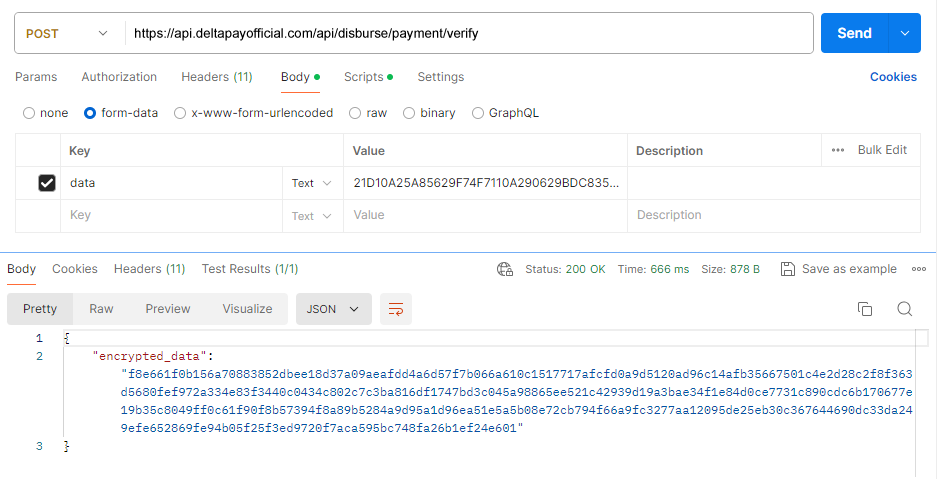
Status Inquiry API
API consumers will pass API body as encrypted and will also expect response in encrypted form. Encryption algorithm along with keys to be shared while integration onboarding.
AES -128 -CBC with HEX (BASE16) notation applied for encryption/decryption. API keys to be shared separately.
https://www.devglan.com/online-tools/aes-encryption-decryption // You can use this reference for encryption and decryption.
Api Details
Below is the API signature.
Url
https://api.deltapayofficial.com/api/disburse/payment/verify
API Header
Following is the sample header APIs..
- PublicKey : ae32030e4f15d2a2d4a425e3a8fc69af6285ec
- SecretKey : 67c184cd2f9094ed4f84125b9d9a41941db74
- AesKey : I7kEZ8gCFPHA7V
- AesIv : AVXd9CylwhDhbh
API Request Body Specification
{ "order_id":"533421343" }
Below is the sample expected Form body for disbursement API which needs to be passed
{ "data": 5C2C852669D152E9E844701BA831C770851F0D944 4951E77B309591B70D27081 }
API Response
Below is the sample unencrypted response for disbursement API
{"Api_status":"success","data":{"order_id":"5334321343","amount":"100","order_status":"Pending", "type":"jazzcash”,"number":"03096698418",”ipn_url”:”https:\\abc.com”,"response":""}}
Below is the encrypted response against mobile wallet API which consumer will get
{ { "encrypted_data": "1f59f5a483cf788775565e13d5030840017568e2665a32cdd090ca0270b61e5cfcbdae 9c4f3393a061c5a559d47cc3811080732b630ebd7dc64d5e41d62711d3963407146cad761207898d3584f98710 33aa6a8cd8936b77fe083cb1105ae982239b278fbb8b605aee9137e83869cca51e93b77fa06063c0b52408f2735 b638be54dec47646758c16698f50b79523b6928d047cf3e0aa2152439517dc362a69f0969b687dcb040e119bdb5be ce0cf08fc377131ddfd084ac423a57bab1351b016c1e871cae00f3a46e6484135ce4feab72080f00" } }
.png)
Disbursement Status Codes
Every Disbursement/Payout API in this documentation — including the
Status Inquiry API and the Mobile Wallet & IBFT disbursement
API — reports transaction state using the order_status field. Regardless of
which endpoint is called, this field can only ever return one of the three standardized
values below. Integrators should design their systems to handle all three states.
| Status | Description | Recommended Action |
|---|---|---|
| Pending | The disbursement request has been accepted and is awaiting confirmation from the payout channel. | Continue polling the Status Inquiry API, or wait for the IPN callback. Do not treat this as a final state. |
| Paid | The funds have been successfully credited to the recipient's mobile wallet or bank account (IBFT). | Mark the payout as complete and reconcile it against your internal records. |
| Declined | The disbursement request failed or was rejected by the payout channel and no funds were transferred. | Mark the payout as failed. Review the response message and retry with a new order_id if required. |
Note: Pending is always the initial state of a disbursement.
A payout only transitions to Paid or Declined once processing by
the payout channel has completed; these two are terminal states and will not change further.
IPN / Callback Response
The callback response will be sent to the IPN URL provided by the merchant in the ipn_url parameter.
For Collection/Payin APIs, the callback response will be received in JSON format.
For Disbursement/Payout APIs, the callback response will be received in encrypted format, and the user must decrypt it using their own provided keys.
Decrypting the Disbursement IPN / Callback
Disbursement/Payout callbacks are encrypted using the same algorithm and keys issued during
integration onboarding — AES-128-CBC with HEX (BASE16)
notation. These are the identical AesKey and AesIv values used to
encrypt requests for the Disbursement APIs (see
Mobile Wallet & IBFT and
Status Inquiry API).
- Algorithm: AES-128-CBC
- Encoding: HEX (BASE16)
- Key: AesKey — shared during integration onboarding
- IV: AesIv — shared during integration onboarding
Raw Callback Payload
The callback body posted to your ipn_url will look like this:
{
  "encrypted_data": "1f59f5a483cf788775565e13d5030840017568e2665a32cdd090ca0270b61e5cf8ae957030948dffda788217b2e0dcf79b66ecdadd14d7a72259889146ae0fc6751716b5bd1e319f8fa728253552e2fb40e8fe1c838940a5accf6927b06cf2fd560b0814d047a5a7e508814414c3906495876da12e9d17f1626a24d2f26e443524084d01d5240e7b431bd49eaa59f0ec340314c04fa73fbcb60fa618080400eb8f28581ae9e2c2f1b7d367c5c0cad455"
}
Decryption Steps
- Read the
encrypted_datavalue from the callback body. - HEX-decode the string into raw bytes.
- Decrypt the bytes using AES-128-CBC with your
AesKeyas the key andAesIvas the initialization vector. - Remove PKCS7 padding from the decrypted output.
- Parse the resulting plaintext as UTF-8 JSON.
You can validate your implementation using
devglan's AES encryption/decryption tool
— set the mode to CBC, the output type to HEX, and supply your AesKey and AesIv.
Decrypted Payload
Once decrypted, the callback resolves to a JSON object identical in shape to the Status Inquiry API response:
{
  "order_id": "5334321343",
  "amount": "100",
  "order_status": "Paid",
  "type": "jazzcash",
  "number": "03096698418",
  "response": ""
}
Note: The decrypted order_status will always be one of the three
values described in Disbursement Status Codes —
Pending, Paid, or Declined. Since Pending
is a non-final state, most integrations only receive a callback once the status has settled
to Paid or Declined.
Bank code list
| Name | Code |
|---|---|
| Al Baraka Bank Limited | 639530 |
| Allied Bank Limited | 589430 |
| Askari Commercial Bank Limited | 603011 |
| Bank AlHabib Limited | 627197 |
| Bank Al Falah Limited | 627100 |
| Habib Bank Limited | 600648 |
| Meezan Bank | 627873 |
| Soneri Bank Limited | 786110 |
| Standard Chartered Bank | 627271 |
| United Bank Limited | 588974 |
| SAMBA | 606101 |
| Dubai Islamic Bank | 428273 |
| Bank Islami Pakistan Limited | 639357 |
| Bank of Khyber | 627618 |
| Bank of Punjab | 623977 |
| JS Bank | 603733 |
| SILK Bank | 627544 |
| Habib Metropolitan Bank Limited | 601724 |
| FINCA Microfinance Bank | 502841 |
| Sindh Bank | 505439 |
| Citi Bank | 508117 |
| Apna Microfinance Bank | 581862 |
| Ubank | 581886 |
| First Women Bank Limited | 628138 |
| Mobilink Microfinance Bank Limited | 585953 |
| ICBC | 621464 |
| Advans Pakistan Microfinance Ltd. | 505895 |
| NRSP Microfinance Bank Ltd. | 586010 |
| MCB Islamic Banking | 507642 |
| MCB Bank Limited | 589388 |
| SME Bank Limited | 604889 |
| WHITE LABEL ATM | 999914 |
| NayaPay Private Limited | 478278 |
| NBP Funds | 629113 |
| Central Directorate of National Savings (CDNS) | 62911600 |
| PayMax (Zong) | 999919 |
| SadaPay | 559049 |
| BYKEA | 999921 |
| SimPaisa | 999922 |
| Abhi Finance | 999926 |
| TAG | 999925 |
| Barwaqt | 999955 |
| OPay | 999947 |
| Keenu | 999906 |
| Faysal Bank Limited | 601373 |
Use this documentation to seamlessly integrate payment functionalities into your application, ensuring a smooth user experience for managing wallets and processing transactions.